Voice AI is getting real now. Businesses want agents that can talk on the phone, answer questions, collect information, and handle routine work without needing a human on every call. Vapi ai is one of the strongest platforms for building these AI calling agents.
If you want to understand how it works at a fundamental level, you need to know the basic building blocks behind every Voice AI system. Once these blocks are clear, the entire workflow starts making sense.
This guide explains everything in simple language so even someone new to the concept can understand it.
What is Voice AI Calling Agent? A Voice AI calling agent is an automated system that handles phone calls using real-time speech recognition, natural language understanding, and AI-driven responses. Tools like Vapi.ai let businesses answer calls, qualify leads, provide support, and run phone-based automation without human staff. This guide explains how Voice AI works, what technology powers it, how Vapi integrates with phone systems, and why companies are adopting AI agents to reduce costs and improve customer experience.
Core Building Blocks of a Voice AI System
To understand Vapi or any voice AI calling system, you need to know the key components that work behind the scenes.
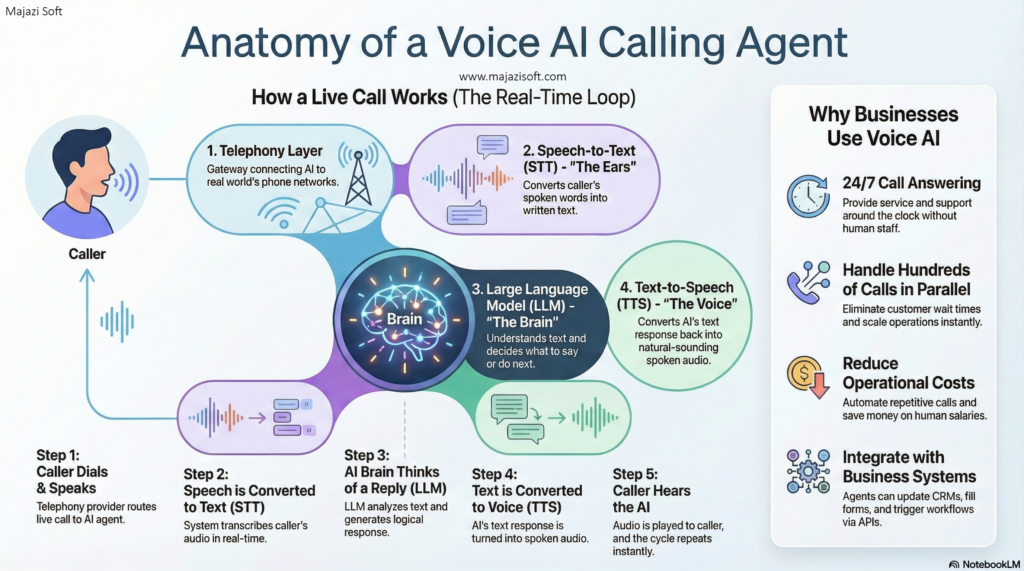
1. Telephony Layer (Phone Numbers, Call Routing, SIP/VoIP)
This is the telecom part. Without it, your AI can’t receive or make real phone calls.
A telephony provider gives you:
- A phone number (local, toll-free, or international)
- The ability to receive incoming calls
- The ability to route those calls to your AI agent
Providers include:
If you want your AI to answer calls on an existing landline number, you convert that number into a VoIP number or forward it to a VoIP number. That process is called SIP trunking or DID routing.
This layer is responsible for:
- Caller dials the number
- Telecom network receives it
- The call is pushed to your AI agent through the internet
Without telephony, your AI agent has no gateway into the real world.
2. STT (Speech to Text)
STT converts what the caller is saying into written text.
Example:
Caller says: “I want to book an appointment.”
STT produces: “I want to book an appointment.”
Why it matters:
- The AI model cannot understand audio directly.
- STT is the first step in every interaction.
Common STT engines:
Better STT = clearer understanding = fewer mistakes.
3. LLM (Large Language Model)
This is the brain of your AI agent.
Once the caller’s speech is converted into text, the LLM decides what to say back.
LLM does things like:
- Understanding the caller’s request
- Following your instructions
- Asking follow-up questions
- Calling APIs
- Making decisions
- Producing responses
Examples of LLMs:
The LLM takes the text from STT and produces the next step.
This is the logic and intelligence layer.
4. TTS (Text to Speech)
TTS converts the AI’s response (text) back into spoken audio.
LLM thinks in text. Humans speak in audio.
TTS builds the bridge.
A good TTS engine sounds natural, fast, and expressive. That’s what makes an AI agent feel like an actual “voice assistant.”
Many choices exist:
- ElevenLabs
- Azure Neural Voices
- PlayHT
- OpenAI TTS
TTS quality directly affects user experience.
5. The Real-Time Conversation Layer
STT, LLM, TTS all run inside a loop.
- Caller speaks
- STT converts speech to text
- LLM understands and generates reply
- TTS converts reply to voice
- Caller hears the response
- Caller speaks again
- Cycle repeats
This loop must run smoothly and quickly.
If there’s delay, the caller gets frustrated.
Vapi specializes in managing this entire real-time conversation with low latency.
6. Vapi Platform Layer (The Orchestration Platform)
Vapi brings all the above pieces together so you don’t have to build everything manually.
Vapi handles:
- Setting up your agent
- Routing calls into the agent
- The real-time audio pipeline
- Connecting STT, LLM, TTS
- Conversation events
- Logging
- Call recordings
- Call transfers
- API calls inside conversations
This is the “glue layer” that connects all components and makes the AI agent work like a proper phone agent.
How the End-to-End AI Calling Agent Flow Works
Here’s the full picture for an inbound call:
- Caller dials your phone number
- Telephony provider routes the call to Vapi
- Vapi connects the call to your AI agent
- Caller audio goes into STT
- STT converts it to text
- LLM reads text and forms a response
- TTS converts response into natural voice
- Caller hears the AI
- Conversation continues until end
That’s the entire engine.
Where Twilio Fits Into All This
Twilio is not AI.
Twilio is telecom.
Twilio gives you:
- Phone numbers
- Incoming call capability
- Outgoing call capability
- Routing and forwarding
- SIP trunk support
- Call recording
- Call logs
Twilio is used to connect the telecom world to your AI world.
You can also use Telnyx, Plivo, or local VoIP providers.
Why Businesses Use AI Calling Agents
Businesses get this technology for reasons like:
- 24/7 call answering
- No human salaries for repetitive calls
- Handling hundreds of calls in parallel
- Reduced wait times
- Always polite, always consistent
- Can integrate with backend systems
- Collects structured information every time
If you calculate the cost versus the number of calls, most businesses save serious money.
General FAQs
1. Can an AI agent answer a real phone call?
Yes. If the call is routed through a telephony provider that connects to Vapi.
2. Can I use my existing landline number?
Yes, but you must port or forward it through a VoIP/SIP provider.
3. Is there a delay when talking to the AI?
If STT, LLM, and TTS are configured properly, the delay is minimal.
4. Does the AI need training?
Not traditional training.
You give it instructions, examples, and rules. The LLM handles the intelligence.
5. What costs are involved?
You pay for:
- Phone number
- Inbound call minutes (telecom cost)
- AI runtime (STT + LLM + TTS + Vapi platform)
6. Can AI transfer calls to a human?
Yes. Vapi supports call transfers.
7. Can AI fill forms or update CRMs?
Yes, through API calls inside the conversation.
8. How does a Voice AI agent know what to say?
You give it instructions, rules, and conversation guidelines. These instructions act like a script, but more flexible. The LLM uses them to understand what to ask, what to answer, and how to guide the caller.
9. Can I give the agent my own documents or policies?
Yes. You can upload your business documents, FAQs, product information, pricing sheets, or service policies. The agent uses these as reference material so it can respond accurately according to your business.
10. What types of voice agents can I create?
You can build almost any kind of automated phone agent, for example:
- Appointment booking agent
- Customer support agent
- Inquiry-handling agent
- Order tracking agent
- Lead qualification agent
- Billing information agent
- Technical support triage agent
- Cold-calling or outbound sales agent
- Multi-language helpline agent
- Virtual receptionist
If the workflow can be explained, the agent can handle it.
11. Can I set up a voice AI agent myself?
If you’re technical and comfortable with APIs, webhooks, and telephony providers, you can set it up on your own. The setup isn’t rocket science, but it does require understanding STT, LLM, TTS, telecom routing, and Vapi configuration.
12. Is there someone who can set up a Vapi AI calling agent for me?
Yes. Majazi Soft provides full setup services for Voice AI calling agents.
They will:
- Configure your agent
- Handle Twilio, Telnyx, or VoIP routing
- Design prompts and conversation flows
- Connect backend APIs
- Optimize the STT, LLM, and TTS pipeline
- Test and deploy the agent
You only pay Majazi Soft for the setup fee.
All monthly or usage-based telecom/AI bills will be paid directly by you to Vapi/Twilio.
This gives businesses full transparency and control over their ongoing costs.
13. Can the AI agent speak multiple languages?
Yes. Language support depends on the STT and TTS engines you select. You can create agents that handle English, Urdu, Arabic, German, and more.
14. Do I need a server to run the agent?
No. Vapi hosts the AI runtime.
If you want the agent to access your internal data, then you may need a simple backend or webhook.
15. Can the AI recognize returning customers?
Yes. You can integrate your CRM so that the agent checks caller ID and identifies existing customers before starting the conversation.
16. Can I run multiple agents for different departments?
Yes. You can create separate agents for:
- Sales
- Support
- Billing
- HR
- After-hours service
And assign different phone numbers or routing rules to each.
17. Can the agent filter spam or irrelevant calls?
Yes. You can instruct the agent to detect spam behavior and end the call immediately, saving unnecessary runtime cost.
18. What happens if the agent can’t answer something?
You can set fallback rules:
- Transfer to a human
- Collect caller details
- Create a ticket
- Send the info via email or API
- Play a fallback message
This keeps the system reliable.
19. Can I make the AI agent call customers back automatically?
Yes. Vapi supports outbound calls. You can use this for reminders, follow-ups, confirmations, or outreach.
20. Can the agent fill forms or store data?
Yes. Using APIs or webhooks, the agent can:
- Submit forms
- Save leads
- Update CRM records
- Log inquiries
21. How secure is the system?
Security depends on your setup. Vapi already provides encryption and secure connections. You can add extra layers using your backend for sensitive workflows.
22. Can I integrate Vapi with Zapier or Make so calls trigger automated workflows?
Yes. Vapi has native integrations with Zapier and Make. You can use those integrations to trigger external workflows when a call ends (or when an assistant is created, etc.), or to make outbound calls from a workflow (for example when a new lead is added in a CRM).
Closing Thoughts
Voice AI isn’t some far-off sci-fi gadget anymore. Platforms like Vapi make it practical for real businesses to automate calls, qualify leads, answer customer questions, and operate 24/7 without burning money on huge call teams. Whether you’re a startup trying to scale or an established company looking to reduce manual workload, building a voice agent today is as realistic as launching a website.
If you want to do it yourself, great. The tools exist and the ecosystem is growing fast.
But if you’d rather skip the technical headaches and want a proper, production-ready setup without spending weeks learning SIP, TTS engines, or call routing, Majazi Soft can set up the entire AI calling system for you.
We handle:
- Voice AI agent setup with Vapi
- Twilio integration and number configuration
- Agent training using your documents and business policies
- Automation with Zapier, Make, webhook systems, or your CRM
- End-to-end testing and deployment
You only pay for our one-time setup service, and after that, all recurring usage bills (Vapi, Twilio, TTS, etc.) stay fully under your control.
Majazi Soft builds the system.
You own it.
You scale it.
Simple.